Illegal Soccer Controls
Read the HUD first. Then bind what the game actually prints, not a fake key list.
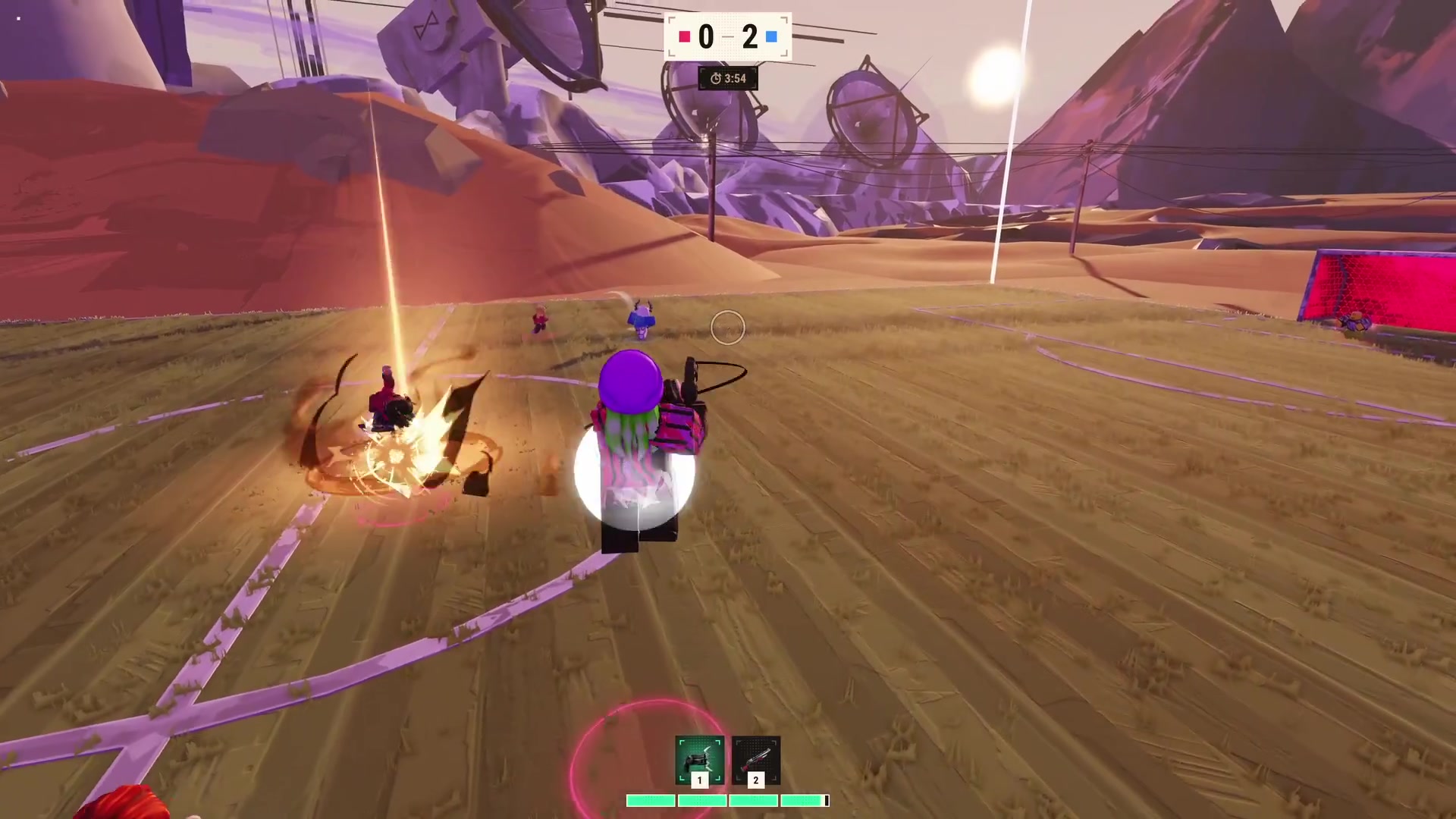
Controls pages fail when they guess. Illegal Soccer’s public materials show a HUD, not a complete PC key sheet. This guide documents what is on screen, how Roblox players usually map it, and where to look in settings when a patch moves a bind. If a creator posts an official list, we will replace the “typical” column. Until then, treat the in-game prompt as law.
The HUD is the control scheme
From official match footage:
| On-screen | What it means | What you do |
|---|---|---|
| Score + timer (top) | Round state | Stop ball-watching; glance every few seconds |
| Team ring (floor) | Ally color | Do not fire that color |
| Slots 1 and 2 (bottom) | Equipped gadgets | Press the matching number / hotbar button |
| Green pips under the slots | Resource / stamina-style bar | Stop jetting or sprinting when they dump |
| Neon goal | Scoring target | Kick toward it; gadgets only to clear the box |
If you cannot see slots 1 and 2, you are in the locker or a menu. Close Jerseys / Balls / Emotes / Goal Effects and return to the pitch.
PC — typical Roblox mapping
These are defaults for Roblox character movement, not a leaked Illegal Soccer PDF:
- WASD — move. Strafe while you dribble; do not hold W into a gunline.
- Mouse — camera. A locked third-person soccer camera fights with shooter aim; pick one per playstyle.
- Shift — sprint on many Roblox sports titles. Confirm in settings. Sprinting with empty pips is a death animation.
- Space — jump / header-style lift if the build allows it. Do not jump into a musket line for style.
- Left click — interact / kick / fire depending on what is equipped. If a gun is in the hand, click is not a pass.
- 1 / 2 — match the on-screen gadget slots. This is the one bind the HUD essentially confirms.
- Tab / Roblox menu — leave, report, shift-lock toggle depending on your client.
Open Roblox Settings → Keyboard & Mouse if any of those do nothing. Creators change context actions without shipping a wiki patch.
Camera: soccer versus gun
Striker players want a wider third-person view so they can see overlapping runs. Chaos players want the camera tight enough to track a shot. You cannot max both. If you keep dying while lining a kick, your camera is a gun camera. If you keep missing shots because the ball is off-screen, your camera is a stadium camera. Flip it between matches, not mid-dribble.
Shift-lock (often Left Control on PC) helps gun aim and hurts some dribbles. Try three matches each way before you blame the tier list.
Mobile and console
Mobile gets on-screen buttons: thumb stick, jump, a kick/action cluster, and two gadget buttons that should mirror slots 1 and 2. Auto-sprint will empty your pips. Turn it off if you cannot hold a line.
Console uses the Roblox gamepad template. Bind gadgets to bumpers if the default buries them behind a hold. The 8-player cap means you will face PC aimers; play keeper or support striker until the stick feels honest.
What we will not list
We will not publish “Q is oil, E is grapple, R is ultimate” until the game prints those letters. Fake bind lists get people reported for “hacks” when they were just following a blog. If your client shows a button hint, trust that hint, then tell the Discord so we can promote it from “typical” to “confirmed.”
Practice drill (five minutes)
- Stand still. Switch slot 1 and slot 2 without moving. If you cannot, you will die in the box.
- Sprint until the green pips drop. Learn the empty timing.
- Camera-flick from goal to mid circle. That is your scan for guns.
- Walk a full box without firing. If you cannot, play a how to play match before you chase clips.
Controls are not a personality. They are the reason how to score works. Bind once, then stop tinkering every death.
Frequently Asked Questions
Quick answers for codes, gadgets, and chaotic matches.
What are keys 1 and 2?
They match the two gadget slots on the bottom of the HUD. Treat them as your only confirmed hotkeys until Repotted posts a full list.
Why don't you list every key?
Because a guessed list becomes wrong after one patch. Use in-game prompts and Roblox settings.
Does mobile have gadgets?
Yes. Look for two on-screen gadget buttons that mirror slots 1 and 2. Landscape helps.
Should I use shift-lock?
Use it for gun playstyles. Turn it off if your dribble camera feels glued to the wrong shoulder.